
An invoice can be marked “sent” for weeks while your cash balance tells a different story. A freelance receivables aging tracker shows which clients owe you money, how much is overdue, and which follow-up deserves attention today. You can build one in Google Sheets or Excel without buying accounting software.
This guide provides a copyable column layout, formulas, an illustrative four-invoice example, reminder scripts, and a realistic weekly review routine. It is for tracking payment collection not for calculating tax or making accounting adjustments.
Quick takeaways
- Track each open invoice separately; one client may have several invoices with different due dates.
- Use the due date to identify overdue invoices, not just the date you sent them.
- Record partial payments and disputed balances so the total reflects what is still collectible.
- Review aged invoices weekly and follow up according to your agreed payment terms.
Free editable spreadsheet: Download the freelance receivables aging tracker (.xlsx). Includes formulas, example invoices and an as-of-date dashboard; replace the fictional records before use.
What is an accounts receivable aging tracker?
Accounts receivable (AR) is money customers owe for invoices you have issued under your agreed terms. An aging tracker groups outstanding amounts by how far they have moved beyond their due dates: current, 1–30 days late, 31–60 days late, 61–90 days late, and more than 90 days late. Accounting platforms use similar aging periods, although settings and labels vary.
An invoice issued on November 1 with payment due November 30 belongs in the Current group on November 12. It is not “11 days late” simply because it was issued 11 days ago. This distinction matters when a client has net-30 terms.
The tracker answers three operational questions. First, how much cash is tied up in unpaid work? Second, which invoices have passed the date promised by the client? Third, is one client becoming a concentration risk? An aging list does not establish whether a debt is uncollectible, and it should not replace advice from your accountant where formal financial statements are involved.
Copy this freelancer invoice aging spreadsheet layout
Start with one row per invoice and use the following header sequence. Copy it into row 1 of a blank spreadsheet; use one consistent currency per sheet, or add a separate currency column and avoid combining unlike currencies.
| Column | Header | What to enter |
|---|---|---|
| A | Client | Customer or company name |
| B | Invoice ID | Unique invoice reference |
| C | Issue Date | Date invoice was sent |
| D | Due Date | Contractual payment due date |
| E | Invoice Total | Amount invoiced |
| F | Payments Received | Amount already collected |
| G | Balance Open | Calculated unpaid balance |
| H | Days Past Due | Calculated overdue age |
| I | Aging Bucket | Current or overdue group |
| J | Status / Dispute | Open, partial, disputed, paid |
| K | Last Follow-up | Date you last contacted the client |
| L | Next Action | Reminder, phone call, reconciliation |
Do not put client banking credentials, sensitive ID documents, or private payment-card data into an ordinary shared sheet. If the sheet is shared with an assistant or bookkeeper, limit access and hide or remove columns they do not need.
Use these formulas to calculate unpaid balances and aging
Enter the following formulas in row 2 and copy them downward. They work in standard English-language versions of Google Sheets and Excel. Some regional spreadsheet settings use semicolons rather than commas.
1. Outstanding amount: G2
=MAX(0,E2-F2)If the invoice total is $1,200 and the client has paid $450, the unpaid balance is $750. The MAX function prevents a negative displayed balance if a customer accidentally pays extra. Investigate any overpayment separately; do not silently discard it from bookkeeping.
2. Days overdue: H2
=IF(G2=0,0,MAX(0,TODAY()-D2))This calculation uses the current date on the computer or spreadsheet service, not the invoice issue date. An unpaid invoice due yesterday shows 1. An invoice due next week shows 0. Paid invoices also show 0.
3. Aging bucket: I2
=IF(G2=0,"Paid",IF(TODAY()<=D2,"Current",IF(H2<=30,"1-30",IF(H2<=60,"31-60",IF(H2<=90,"61-90","91+")))))The bucket becomes Paid if nothing is outstanding. Otherwise it selects the appropriate stage. If you need a consistent historical report, replace TODAY() with a reference to an as-of date in a fixed cell, such as $N$2. That way, the report will not change every time you reopen it.
4. Quick summary totals
In a separate summary area, calculate total outstanding with =SUM(G2:G1000). For the overdue 31–60 group use =SUMIF(I2:I1000,"31-60",G2:G1000). Repeat for the other bucket labels. If you use a different locale, check its function names and argument separators.
Do not add all invoice totals to “revenue” without considering accounting method, refunds, tax, and recognition rules. This is a collections dashboard, not a replacement for financial statements.
Worked example: four freelance invoices
Assume the report date is November 12, 2026. These figures are fictional and only illustrate how the buckets work.
| Client | Due date | Invoice | Paid | Open | Bucket |
|---|---|---|---|---|---|
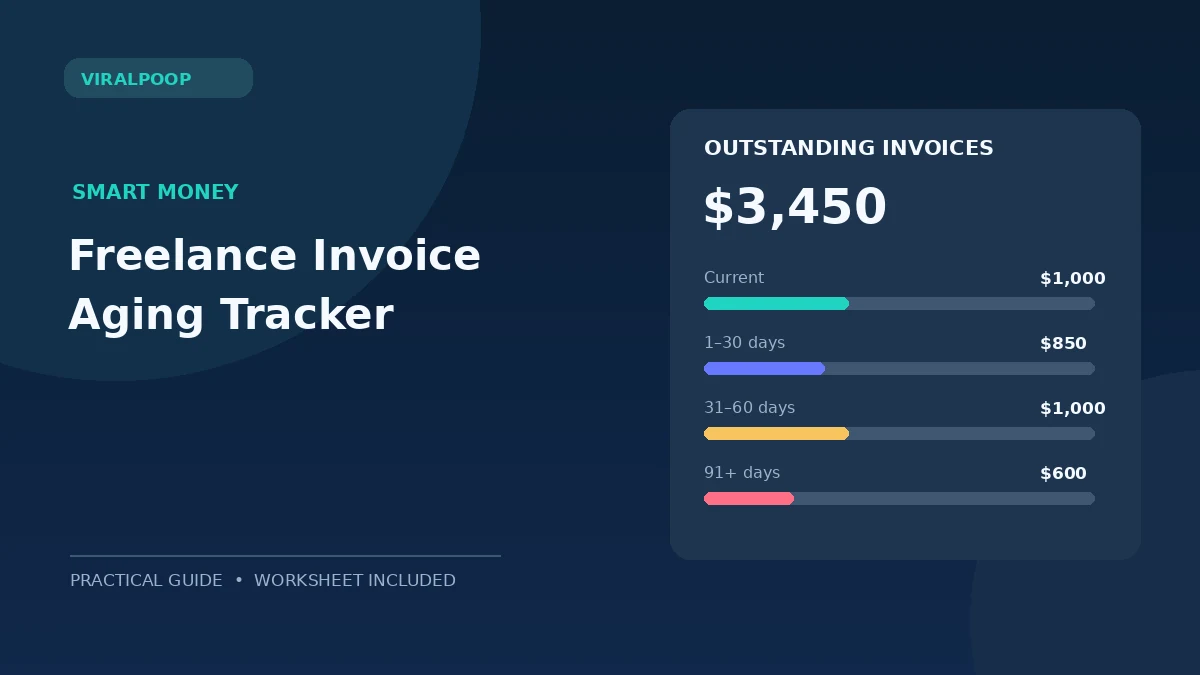
| Aster Studio | Nov 20, 2026 | $1,200 | $200 | $1,000 | Current |
| Northside Co. | Nov 1, 2026 | $850 | $0 | $850 | 1–30 |
| Brightline | Sep 30, 2026 | $1,500 | $500 | $1,000 | 31–60 |
| Willow Media | Aug 5, 2026 | $600 | $0 | $600 | 91+ |
The total open balance is $3,450. Of that amount, $2,450 is already overdue. An important nuance: Brightline’s partial payment means you follow up on the remaining $1,000, not the original $1,500. Willow Media is the oldest issue even though its invoice is smaller than others.
You could use conditional formatting to shade the 61–90 and 91+ rows, but keep the labels visible for accessibility. If a client disputes the amount, mark it clearly and pause automated demands until you reconcile the facts. A polite, accurate follow-up tends to be more useful than repeating the same message.
A practical 20-minute weekly review
Minutes 0–5: reconcile payments
Cross-check cleared transactions against the invoice list. Note which payment belongs to which invoice, especially when the customer pays two invoices in one transfer. Avoid relying solely on “payment sent” screenshots; confirm receipt through the actual payment processor or bank records.
Minutes 5–10: prioritize follow-ups
Sort overdue amounts by age and size. Also consider the relationship: a reliable client with a short administrative delay may need a gentle reminder, while an old unresolved invoice deserves a direct conversation. Set a clear next action for every outstanding row.
Minutes 10–15: send concise reminders
For a first reminder, use: “Hi [Name], I’m checking on invoice [ID] for [amount], which was due [date]. Could you confirm its payment status or let me know if you need another copy? Thank you.”
For a later follow-up: “Hi [Name], invoice [ID] remains open for [amount]. Please confirm when payment is scheduled. If there is an issue with the invoice or deliverable, I’m happy to review the details.”
These are business communication examples, not legal demands. Your contract, jurisdiction, and any relevant debt-collection laws determine which steps are appropriate. Avoid threatening fees or suspension unless those remedies were lawfully agreed and appropriate.
Minutes 15–20: improve the next contract
Look for patterns. Are clients regularly missing a payment link? Do invoices go to a generic inbox instead of accounts payable? Would an upfront deposit or milestone invoice reduce the balance at risk? Record one improvement, then check whether the next month’s aging report improves.
For broader planning, pair this tracker with ViralPoop’s freelance cash-flow management guide and the step-by-step freelance invoicing guide. The aging report tells you who owes you money; cash-flow planning tells you whether you can cover expenses while waiting.
Seven errors to avoid in a freelance A/R tracker
- Using the issue date instead of due date. Always refer to the promised payment deadline when measuring lateness.
- Ignoring partial payments. Show the unpaid balance, not the full original invoice.
- Mixing currencies. Keep separate totals or convert with a clearly documented exchange-rate basis.
- Leaving paid invoices in overdue reports. Set the bucket to Paid and preserve the history.
- Combining several invoices into one row. Different due dates require separate aging calculations.
- Calling disputed amounts collectible without context. Include a dispute field and supporting documents.
- Using a live TODAY() report as a historical snapshot. Store a dated export or fixed as-of date for month-end comparison.
As an external reference, Intuit explains its aging summary and detail reports; Xero describes how to use aging groups for collections. Their software implementations may differ from this simple sheet.
Bottom line
A freelance receivables aging tracker is most useful when you update it regularly and attach a next action to every overdue invoice. Begin with the 12 columns above, a small set of formulas, and a weekly review. A simple, accurate tracker beats a complex dashboard that nobody maintains.
Frequently asked questions
What is the difference between current and 1–30 days overdue?
Current means the payment due date has not passed. The 1–30 bucket means the invoice is between one and thirty calendar days past its due date and still has an unpaid balance.
Should I age a partially paid invoice by the original due date?
Usually yes: keep the original due date for the remaining amount unless you and the client have formally agreed to a revised due date. Record the partial payment separately.
Can I use the tracker instead of accounting software?
It can organize invoice follow-ups for a small operation, but it does not replace bookkeeping, tax records, reconciliation, or financial statements. Use a qualified accountant when those obligations apply.
What is the right time to send an overdue reminder?
Follow the payment terms and communication expectations in your contract. Many freelancers send a polite confirmation shortly after the due date, then a clearer follow-up if no payment or explanation arrives.
How do I stop my historic report from changing every day?
Replace TODAY() in your aging formulas with a fixed report-date cell, or export the spreadsheet as a dated snapshot at month-end.