
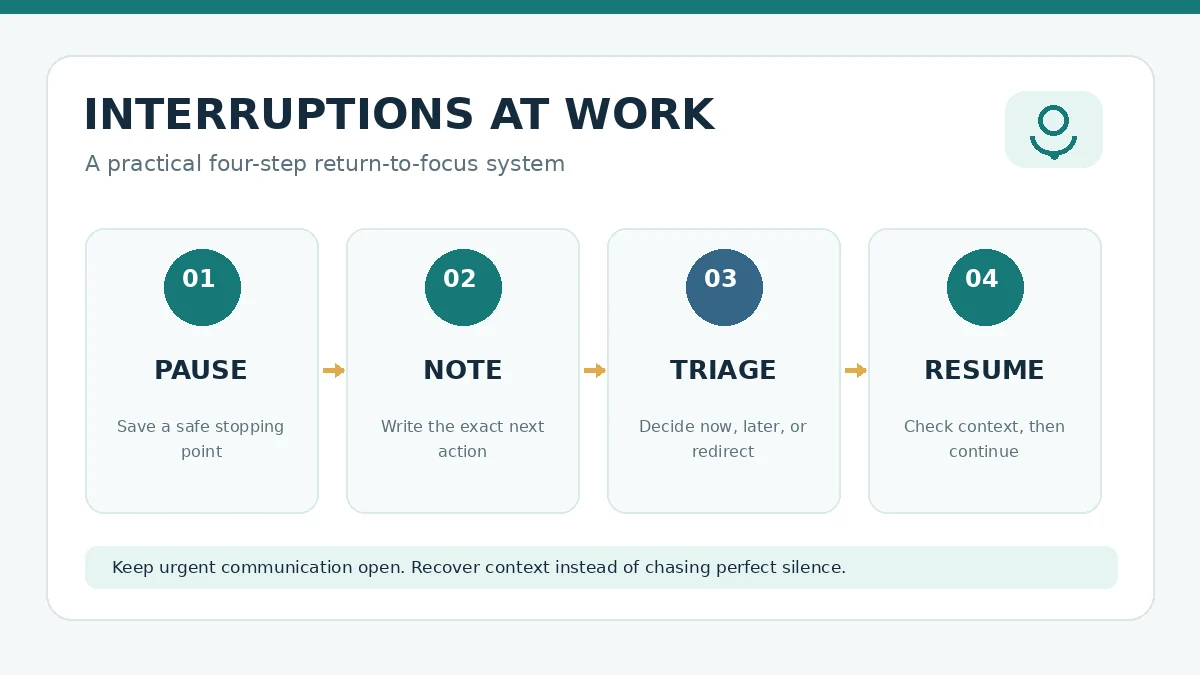
Knowing how to handle interruptions at work is not the same as trying to eliminate every message or conversation. Some interruptions are necessary: a customer needs an answer, a teammate is blocked, or a safety issue cannot wait. The practical skill is to decide what deserves immediate attention and make it easy to return to the task you were doing.
This guide gives you a four-step interruption recovery plan, sample phrases for coworkers, a realistic schedule for jobs with frequent requests, and a one-week measurement worksheet. It is designed for office, remote, freelance and service work, with adjustments for roles that require constant availability.
Quick answer: the pause, note, triage, resume method
When an interruption arrives, use four steps. Pause: stop at a safe boundary if you can. Note: write the exact next action for the original task. Triage: decide whether the new request is urgent, important but schedulable, or neither. Resume: return using your note and check the last completed step before continuing. A 20-second note can be more useful than trying to remember everything in your head.
The point is not to impose a rigid timer on every interaction. It is to reduce the mental effort of reconstructing where you were. A 2018 Organization Science study on a ready-to-resume plan found that briefly planning a return to interrupted work can mitigate attention residue in the situations studied. It does not mean every person will recover the same number of minutes.
Why interruptions can be more expensive than their duration
A two-minute question may arrive while you are comparing data, writing a proposal or checking a spreadsheet. Answering it is one task; rebuilding your earlier context is another. The second cost is easy to miss because it does not appear on a calendar. Research on task resumption suggests that interruption timing, complexity and the nature of the primary task affect how people resume work. A study indexed by PubMed found that slower, more deliberate resumption sometimes reduced errors, which is a useful reminder that speed alone is a poor success measure.
Do not treat the often-repeated claim that every interruption costs exactly 23 minutes as a universal law. A single average from one context cannot predict the effect of a quick clarification, a long meeting, or a safety-critical alert. Instead, measure your own interruption patterns and the errors or delays that follow.
Step 1: pause at a safe stopping point
If you are writing, finish the sentence or save the current version. If you are working in a spreadsheet, complete the formula and mark the row you were checking. If you are in a live support role, you may need to respond immediately; in that case, use a short spoken or written cue to preserve your place as soon as it is safe.
Some tasks cannot be paused safely. A medical, operational or security-critical request takes priority over a productivity method. The system should support your responsibilities rather than override them.
Step 2: write a ready-to-resume note
Use a small template with three fields: Current state, next action, and location. For example: “Proposal draft: pricing section complete. Next: check the delivery assumptions against the client brief. Location: section 4, comments 2–4.” This is more actionable than “finish proposal.”
For technical work, note the test that failed, the command to rerun, or the file and line you were reviewing. For finance work, record the last reconciled transaction and the discrepancy you still need to check. Never put credentials or sensitive customer information in a visible sticky note. A brief private task note is usually enough.
Step 3: triage the interruption without being rude
Ask two questions: “Does this need action before my next planned check-in?” and “Am I the person who needs to handle it?” A production outage, time-sensitive customer issue or blocked colleague may warrant immediate action. A routine update or optional meeting may be better handled at a planned time. If the request belongs elsewhere, redirect it to the correct person or process.
| Request | Example | Reasonable response |
|---|---|---|
| Urgent and important | A live service is down and you are on call | Respond now; preserve your place if safe. |
| Important but not immediate | A colleague needs feedback by tomorrow | Schedule a specific review window. |
| Quick clarification | A teammate needs a single fact to continue | Answer if genuinely brief, or give an exact reply time. |
| Low-priority interruption | A nonessential notification or unrelated chat | Mute, defer or redirect according to team norms. |
These categories are situational, not labels for people. A coworker’s question may look minor to you but block an entire project. When in doubt, ask about the consequence of waiting rather than assuming urgency from the tone of a message.
Step 4: resume carefully, then confirm the result
Read your note. Reopen the exact file or task. Check the last completed action and perform the next one. In error-sensitive work, pause briefly to verify the context before making a consequential change. The goal is a correct restart, not the fastest possible restart.
When you return to a document, read the previous paragraph before typing. When you return to calculations, check the last value you confirmed. When you return to a conversation, review the most recent decision and owner. This small verification step is especially valuable after a stressful interruption.
How to handle interruptions at work when you cannot block your calendar
Some roles are naturally interruption-heavy. A receptionist, team lead, customer-support specialist or parent working from home may not have uninterrupted 90-minute focus blocks. Build a schedule around realistic availability instead of treating interruptions as personal failure.
Try two short work windows, such as 25 minutes for a task that requires attention, followed by 10 minutes for messages and small requests. If your role requires instant responses, use a 10-minute window and focus on one small deliverable. Choose the duration based on the actual work, not a fashionable rule. For more structured methods, compare time blocking and Pomodoro or review task batching examples.
Scripts that protect focus without damaging relationships
Use plain language and offer a reliable next step. “I can look at this at 2:30. Is anything blocked until then?” communicates availability and invites the requester to explain urgency. “I need five minutes to finish this calculation so I don’t give you the wrong number” explains the risk. “Can you put the question in the project thread? I’ll answer during the next check-in” makes the request visible to the team.
If you manage people, avoid a policy that treats every question as an annoyance. Publish clear escalation rules and hold predictable office hours. Encourage employees to distinguish immediate incidents from questions that can wait. When a teammate repeatedly interrupts because a process is unclear, improve the process instead of asking them to be more disciplined.
One-week interruption log: find your real bottleneck
Track only what helps you make a decision. For five workdays, record the time, interruption type, whether it was truly urgent, whether you used a ready-to-resume note, and whether the restart caused rework. Avoid recording private message content or sensitive personal details.
| Day | Trigger | Urgent? | Resume note? | Outcome |
|---|---|---|---|---|
| Monday | Team chat | No | Yes | Returned to report with no rework. |
| Tuesday | Customer escalation | Yes | Yes | Handled issue; verified last spreadsheet row. |
| Wednesday | Unplanned meeting | No | No | Had to reread notes before continuing. |
These rows are fictional examples, not study data. At week’s end, count how many interruptions were genuinely urgent, how many could have been scheduled, and how many led to an error or repeated work. Pick one change to test next week. For example, move routine questions to two predictable check-ins while preserving an escalation channel.
Notification settings that can help
Use the fewest channels necessary for genuinely urgent communication. Consider disabling nonessential banners, grouping routine alerts and using status indicators that explain when you will check messages. A field study of TimeToFocus examined feedback about interruption duration and found benefits in its tested contexts; it does not establish that every notification tool works for every team.
If your workspace is cluttered with tabs, messages and files, start with a digital declutter checklist. If the issue is choosing which task deserves attention, use Eisenhower Matrix examples. These articles address related but distinct problems: managing information, setting priorities and resuming interrupted work.
What not to do
Do not label every message “urgent” without checking the consequences. Do not keep notifications completely disabled if you are responsible for immediate incidents. Do not measure success only by uninterrupted hours, because collaboration is part of many jobs. Do not assume that the fastest return to a task is the safest return. And do not use a complicated tracking system that takes longer than the interruptions you are trying to manage.
A practical interruption recovery checklist
- Finish or save the current safe unit of work.
- Write the exact next action and where to find it.
- Ask whether the interruption must be handled now.
- Respond, schedule or redirect with a clear next step.
- Return to the saved context and verify the last completed step.
- Review recurring interruptions weekly and change one team process.
Bottom line: handling interruptions at work is a design problem, not just a willpower problem. A short ready-to-resume note, a sensible urgency rule and a deliberate restart can make demanding days more manageable without cutting off necessary communication.
Frequently asked questions
How do I deal with coworkers who interrupt constantly?
Ask what is blocked, explain when you can respond, and offer a predictable check-in time. If repeated questions point to missing documentation or unclear ownership, fix that shared process instead of treating the coworker as the problem.
Should I turn off every notification to focus?
Not if your role includes urgent support or safety responsibilities. Keep a reliable escalation channel and group routine notifications into planned review periods. Coordinate expectations with your team.
What is the fastest way to resume after an interruption?
Use a short note stating your current state, next action and location. On return, read the note and verify the last completed step. In error-sensitive tasks, accuracy matters more than shaving off a few seconds.
0 thoughts on “How to Handle Interruptions at Work: A 4-Step Resume Plan”